




Description
Download Clean After Me – privacy, clean, security, portable, USB, shared computer, history, cookies, temporary files, digital footprint
Overview
Clean After Me is a lightweight, portable application designed to enhance digital privacy on shared or public computers. Its primary purpose is to eliminate traces of user activity, including browsing history, cookies, temporary files, and deleted data, ensuring that no personal information remains after a session. This tool is particularly useful for individuals who frequently use public workstations, library computers, or shared office machines where privacy is a concern. By removing digital footprints, Clean After Me helps prevent unauthorized access to sensitive data such as login credentials, financial information, or personal communications.
The app targets users who prioritize security without the complexity of system-level configurations. It is ideal for students, business travelers, remote workers, and anyone needing to maintain confidentiality across multiple devices. Unlike traditional privacy tools that require installation and configuration, Clean After Me operates without leaving behind any residual files, making it suitable for use on machines where administrative access is restricted. Its portability allows users to carry it on a USB drive and run it directly from the device, enabling consistent privacy protection regardless of the host system.
Although the developer did not provide additional technical details, the application has been available since 2014, indicating a long-standing presence in the security utility space. Its continued relevance suggests a reliable core functionality that meets a persistent need in the digital landscape. In an era where data privacy is increasingly critical, Clean After Me serves as a simple yet effective solution for users seeking immediate, on-demand protection without the overhead of complex software.
Key Features & Functionality
- Portable Operation: Clean After Me runs directly from a USB drive without installation, preserving system integrity and ensuring no trace is left behind on the host machine.
- One-Click Privacy Protection: A single click initiates a full cleanup, streamlining the process for users who need fast, reliable privacy measures.
- Comprehensive Data Removal: The tool can delete up to 26 types of digital traces, including browsing history, cache files, cookies, temporary internet files, and recycle bin contents.
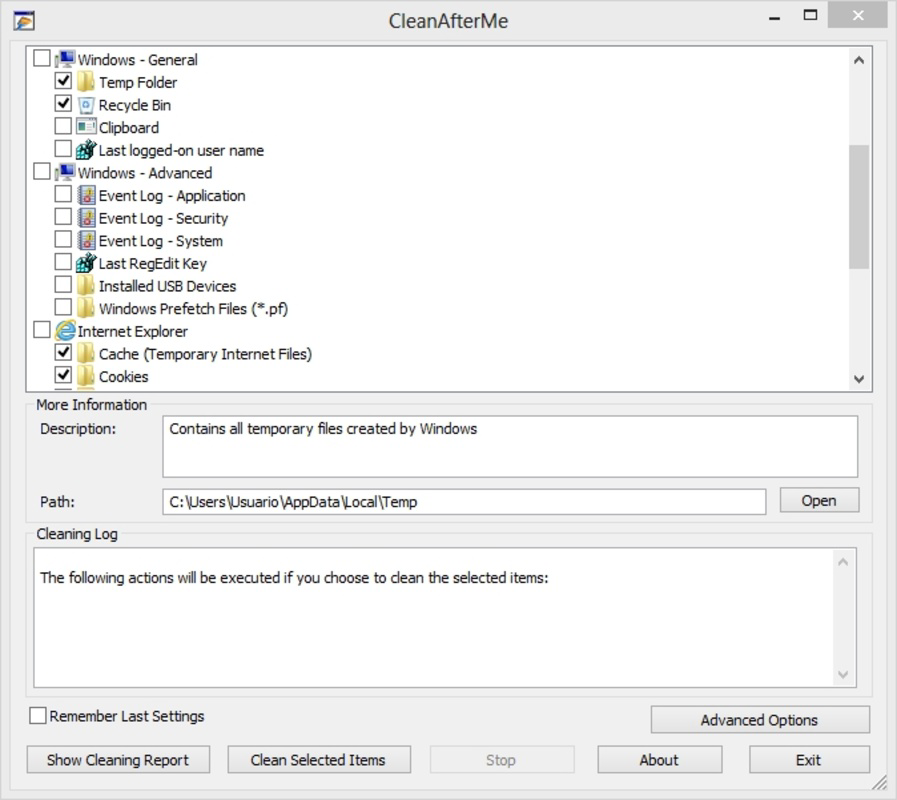
- Customizable Cleanup Options: Users can select specific data types or directories to remove, allowing for tailored privacy protection based on individual needs.
- Intuitive Interface: The application features a clean, user-friendly layout that requires minimal learning, making it accessible to non-technical users.
For example, a business professional using a shared computer at a conference can plug in the USB drive, launch Clean After Me, and instantly erase all session data. Similarly, a student working in a library can protect their login details and browsing habits by running the tool before shutting down. The customizable feature enables users to focus on high-risk data types like cookies and cache while skipping less critical items, optimizing both time and security. This flexibility ensures that the tool adapts to different use cases without compromising effectiveness.
Interface, UX & Performance
Clean After Me features a minimalistic user interface designed for clarity and ease of use. The layout is straightforward, with clearly labeled options for selecting data types to delete. Navigation is linear and intuitive, allowing users to make selections and initiate cleanup with just a few clicks. The visual design avoids clutter, focusing on essential functions without distractions.
Although the developer did not list formal performance metrics, the application’s lightweight size of 12.8 MB suggests efficient resource usage. It is likely optimized for quick startup and minimal system impact, which is crucial when running on shared or older machines. The tool operates without requiring administrative privileges, further enhancing its usability across restricted environments.
Performance on different device categories is not publicly documented. However, given its portable nature and low file size, it is expected to function smoothly on a wide range of Windows systems, including older models. Responsiveness appears to be a priority, as the one-click cleanup feature implies fast execution. Stability is likely maintained through consistent operation across sessions, though no user-reported issues were provided. Overall, the UX is designed around simplicity and speed, aligning with the needs of users who value privacy without complexity.
Platform Compatibility & Technical Requirements
Clean After Me is designed exclusively for the Windows platform. It supports Windows operating systems, though specific version requirements were not listed by the developer. The application is available as a standalone executable file, meaning it does not require installation or registry modifications.
The file size is 12.8 MB, which is compact and suitable for storage on USB drives or other portable media. This small footprint enhances portability and reduces the risk of performance bottlenecks on low-resource machines. Compatibility information was not fully disclosed, so users should exercise caution when running the app on newer or less common Windows variants. The developer did not specify minimum OS requirements, so it is advisable to test the tool on target systems before relying on it for critical privacy tasks.
Pros and Cons
Pros
- Portable and runs from a USB drive without installation.
- Simple, intuitive interface suitable for all user levels.
- Comprehensive cleanup of up to 26 types of digital traces.
- One-click operation for rapid privacy protection.
- Free to download and use, with no hidden costs.
Cons
- Specific operating system requirements were not disclosed.
- No official update history or version changelog provided.
- Compatibility with modern Windows versions is uncertain.
- Limited technical documentation from the developer.
- Does not include real-time monitoring or automatic cleanup triggers.
FAQ
Is Clean After Me safe to use on public computers?
Yes, Clean After Me is designed specifically for use on shared or public machines. It leaves no trace after execution and does not require installation, minimizing the risk of data exposure.
Can I use Clean After Me on a Mac or Linux system?
Currently, the application is only available for Windows. There is no official support for macOS or Linux platforms.
Does Clean After Me require internet access?
No, the tool operates offline and does not require an internet connection to function. All cleanup processes are handled locally on the host machine.
How often should I use Clean After Me?
It is recommended to run Clean After Me after every session on a shared or public computer to ensure that no personal data remains behind.
Is the app free to download and use?
Yes, Clean After Me is available at no cost. There are no in-app purchases or subscription models.
Final Thoughts
Clean After Me delivers a focused, reliable solution for users seeking immediate privacy protection on shared computers. Its portability, ease of use, and comprehensive cleanup capabilities make it a valuable tool for anyone concerned about digital footprints. While the app lacks modern features like automatic triggers or detailed logging, its core functionality remains effective and relevant. The absence of installation and the one-click operation ensure that even non-technical users can maintain strong privacy hygiene.
For students, travelers, and professionals who rely on public or shared systems, Clean After Me offers peace of mind without complexity. Its free status and minimal system requirements enhance accessibility. Despite limited developer transparency, the app continues to serve a niche but essential need in the security toolkit.
Download Clean After Me now
Guides & Tutorials for Clean After Me
How to install Clean After Me
- Click the Preview / Download button above.
- Once redirected, accept the terms and click Install.
- Wait for the Clean After Me download to finish on your device.
How to use Clean After Me
This software is primarily used for its core features described above. Open the app after installation to explore its capabilities.
User Reviews for Clean After Me 0
No reviews found


